Your Contract

Your Contract in ARBuy

Promoting your contract in the ARBuy Marketplace is an essential part of your success. Review how our team handles most of that for you and how you can customize how your contract appears in the ARBuy Marketplace.


Step 1
Set up your profile and understand how ARBuy works

Getting Started in ARBuy

Step 2 (You're Here)
Review your contract details and manage your marketplace listing

Your Contract in ARBuy

Step 3
To Maintain Compliance: Learn how to submit required reporting and payment

Reporting & Payment

Step 4
Find helpful guides, contact support, and access state-specific tools

Vendor Resources

Your Contract in ARBuy

Take a look at how we promote your contract in ARBuy

  1. Your Contract In The ARBuy Marketplace
    What do buyers see?
    4:00


    This video will walk you through what a typical shopper from a State or Local Agency would see when searching for contracts in the ARBuy Marketplace. 


    Our team provides most of the basic information for you. This information comes from your contract in ARBuy. 


    As a Vendor, you have the option to enhance some of the information in the Marketplace. To see how, view the next lesson: Enhance Your Contract In The ARBuy Marketplace

    Resources

  2. Enhance Your Contract In The ARBuy Marketplace

    5:00
    Updating Your Information

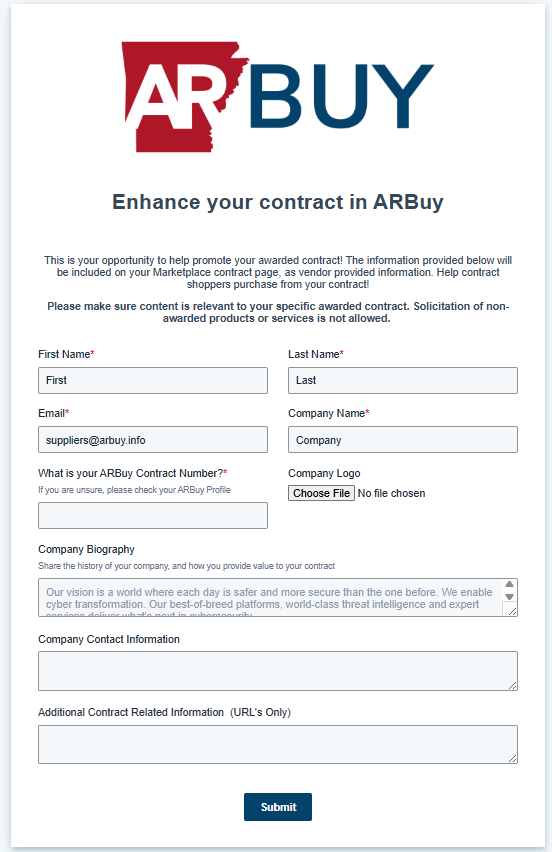
    To update your information in the ARBuy Marketplace, simply fill out this form with your requested changes and our team will coordinate with you to make sure the updates match your contract: 


    Update Information

Enhance Your Contract In ARBuy

We aim to make it as easy as possible to enhance your contract in the ARBuy Marketplace. To do so, we ask that you fill out this form with more detailed information about your company so that we can help you as quickly as possible.

  • Customize what buyers see
  • Add additional marketing content
  • Tell buyers how to purchase from you

View Form

image-png-1

Frequently Asked Questions

Ask us a Question

No Results

How do I find vendors/suppliers for what I need to purchase?
  • You can search for vendors without signing in to NJSTART, however you get much more by signing in. Go to https://www.njstart.gov and search vendors using keywords.
  • When signed in to NJSTART, you can review all contract related attachments such as the original solicitation documents, price lists, and methods of operation if applicable. You can also verify the vendor’s Business Registration Certificate and AAEEOC status among other key features.
  • Marketplace is an integral component of the NJSTART eProcurement system. It allows suppliers to load product/service catalogs related to their contracts with the State. Once catalogs are in place, State users and local governments will use the Marketplace to search for State contracts, shop from them (shopping basket functionality), and generate POs that will be transmitted to the supplier electronically.
How do I find vendors/suppliers for what I need to purchase?
  • You can search for vendors without signing in to NJSTART, however you get much more by signing in. Go to https://www.njstart.gov and search vendors using keywords.
  • When signed in to NJSTART, you can review all contract related attachments such as the original solicitation documents, price lists, and methods of operation if applicable. You can also verify the vendor’s Business Registration Certificate and AAEEOC status among other key features.
  • Marketplace is an integral component of the NJSTART eProcurement system. It allows suppliers to load product/service catalogs related to their contracts with the State. Once catalogs are in place, State users and local governments will use the Marketplace to search for State contracts, shop from them (shopping basket functionality), and generate POs that will be transmitted to the supplier electronically.
How do I find vendors/suppliers for what I need to purchase?
  • You can search for vendors without signing in to NJSTART, however you get much more by signing in. Go to https://www.njstart.gov and search vendors using keywords.
  • When signed in to NJSTART, you can review all contract related attachments such as the original solicitation documents, price lists, and methods of operation if applicable. You can also verify the vendor’s Business Registration Certificate and AAEEOC status among other key features.
  • Marketplace is an integral component of the NJSTART eProcurement system. It allows suppliers to load product/service catalogs related to their contracts with the State. Once catalogs are in place, State users and local governments will use the Marketplace to search for State contracts, shop from them (shopping basket functionality), and generate POs that will be transmitted to the supplier electronically.
How do I find vendors/suppliers for what I need to purchase?
  • You can search for vendors without signing in to NJSTART, however you get much more by signing in. Go to https://www.njstart.gov and search vendors using keywords.
  • When signed in to NJSTART, you can review all contract related attachments such as the original solicitation documents, price lists, and methods of operation if applicable. You can also verify the vendor’s Business Registration Certificate and AAEEOC status among other key features.
  • Marketplace is an integral component of the NJSTART eProcurement system. It allows suppliers to load product/service catalogs related to their contracts with the State. Once catalogs are in place, State users and local governments will use the Marketplace to search for State contracts, shop from them (shopping basket functionality), and generate POs that will be transmitted to the supplier electronically.